Description
A timer event defines a time delay.
Purpose of object
The symbol can be added to an activity, this can be used to change the process flow, if an activity lasts too long. Second, the symbol can be used as standalone, where it can be used to let the process wait a defined time.
Create
-
Create a process model.
-
Then point the mouse on "process", as default, this field is on the right side of the Orchestra window.
-
Click on the folder intermediate events to see its content.
-
Click on "timer".
-
- Click on any place in your process model.
- Click on the activity you want to bind with the timer.
-
Double click on the timer to set up the delay.
Icon

Timer symbol, attached to a call event
Configuration
To configure the timer, double click the timer symbol and type in the needed values. The time unit can also be chosen. If needed, the Description of the timer can also be changed.
Typically the channel searches its source for available data periodically:

To change the intervals at which the channel searches its data, the user clicks on the button labeled with three dots and then can edit the timer properties.
There are two types of timers, periodical timers and absolute timers. Both are configured using the same dialog. In most cases a periodically timer is used which regularly creates a signal.
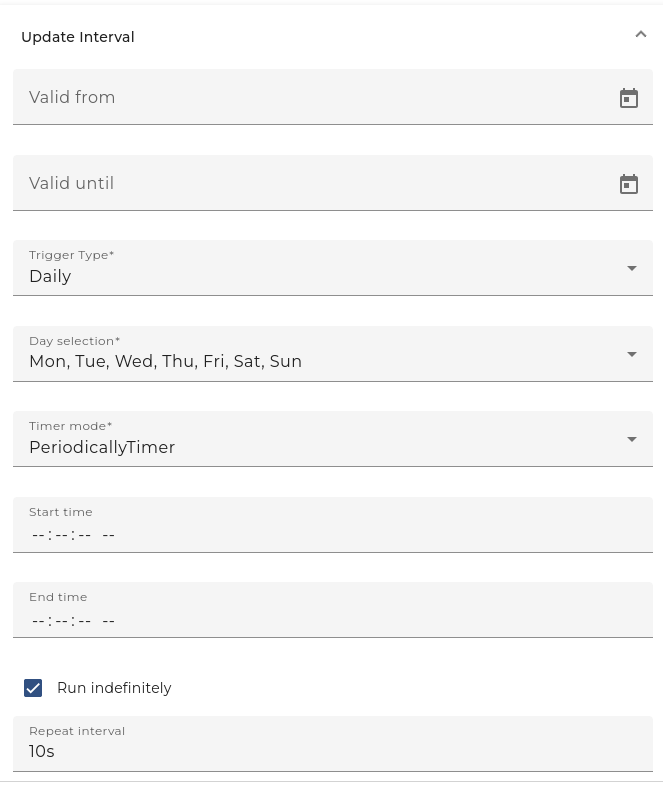
timer configuration
-
Description for the timer, e.g. polling timer
-
Valid from/to Here the user can state a time span where the timer is valid. Outside of this time span, the timer is invalid and doesn't create events.
-
Mode This Option is only sensible if the timer dialog is used to configure a timer event. In the context of channels it is disabled.
-
Trigger type The user may restrict the timer to work only at certain days:
-
Daily Here the user may restrict the timer to fire events on certain days of the week
-
Monthly Here the user may restrict the timer to fire events at a particular day of the month
-
-
Absolute If an absolute timer is configured, the user must enter a fixed time at which the timer raises an event. E.g. one could declare the timer to run every day at 6:00 in the morning.
-
Periodically If an Periodical timer is used the user has to configure the following properties:
-
Start/End time A time span of the day where the timer shall be active
-
Repeat count Here the user may restrict the timer to fire only a certain amount of events after start. E.g. one could declare the timer to start at 6:00 AM an fire exactly 2 times. The standard value is infinite, that means there is no restriction.
-
Repeat interval the time interval after which an event is fired periodically.
-